

Checking your Employees’ Provident Fund (EPF) balance has become easier. The Employees’ Provident Fund Organisation (EPFO) has introduced a new WhatsApp-based service that allows members to access important Provident Fund information directly through WhatsApp.
With this new facility, employees no longer need to depend entirely on the EPFO member portal or other platforms to check basic PF account details. Members can now send a simple WhatsApp message to access their PF balance, view their latest five transactions and download their EPF passbook.
The service was officially launched on 1 November 2026, marking another important step towards making EPFO services more accessible and convenient for employees across India.
If you are an EPF subscriber and want to know how this new facility works, this article explains everything you need to know, including the official EPFO WhatsApp number, available services and the complete step-by-step procedure to check your PF balance.

EPFO WhatsApp Number 2026: What Is the Official Number?
EPFO has introduced a dedicated WhatsApp facility through which members can access selected provident fund services.
The official WhatsApp number announced by EPFO is:
EPFO Official WhatsApp Number
+91 87964 41800
Always verify that you are contacting EPFO’s official WhatsApp account before sharing any personal information.
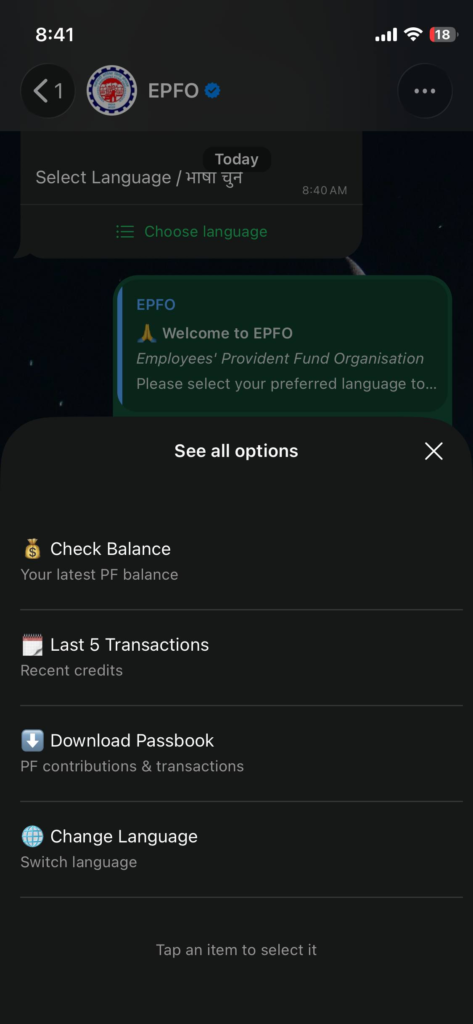
Members can start using the service by sending a simple message such as “Hi” to this number. The chatbot will guide users through the available options.
The main objective of this initiative is to make routine PF-related services easier to access without requiring members to visit an EPFO office for basic information.
What Services Are Available Through EPFO WhatsApp?
The new WhatsApp facility provides access to selected EPFO services. Members can use it to check their account information and obtain assistance with certain employment-related scheme requirements.
Here are the main services announced by EPFO.
| Service | What You Can Do |
|---|---|
| PF Balance Check | View your available EPF balance |
| Last 5 Transactions | Check your five latest PF transactions |
| EPF Passbook | Access and download your PF passbook |
| PMVBRY Assistance | Get personalised guidance regarding scheme requirements |
These services can be particularly helpful for salaried employees who regularly want to check whether their PF contributions have been credited.
However, remember that the WhatsApp facility provides selected services. It does not necessarily replace the complete EPFO member portal or other official platforms for every PF-related requirement.
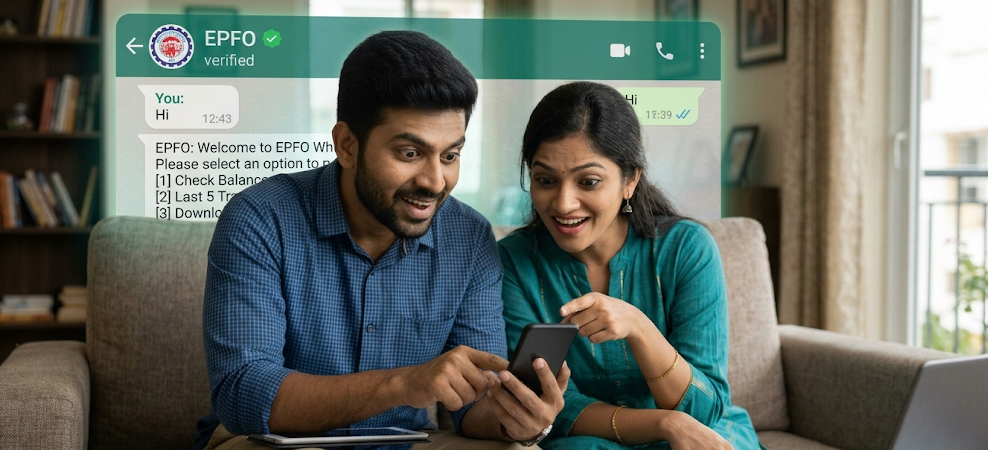
How to Check PF Balance Through EPFO WhatsApp Number? (Step-by-Step Guide)
Checking your PF balance through WhatsApp is a straightforward process. You need a smartphone with WhatsApp installed and access to the mobile number associated with your UAN for identity verification.
Follow the instructions below carefully.
Step 1: Save the Official EPFO WhatsApp Number
First, open the Contacts application on your smartphone.
Select the option to create a new contact and enter the following details:
- Contact Name: EPFO WhatsApp Services
- Mobile Number: +91 87964 41800
After entering the details, save the contact.
You can also open the WhatsApp chat directly using the official number without saving it in your contacts.
Step 2: Open WhatsApp on Your Mobile Phone
Now, open WhatsApp on your smartphone.
Tap the search icon and search for the contact name you saved in the previous step.
Select the EPFO WhatsApp contact to open the conversation.
Before proceeding, make sure that you have opened the correct official EPFO account. Avoid responding to similar-looking accounts or unknown numbers.
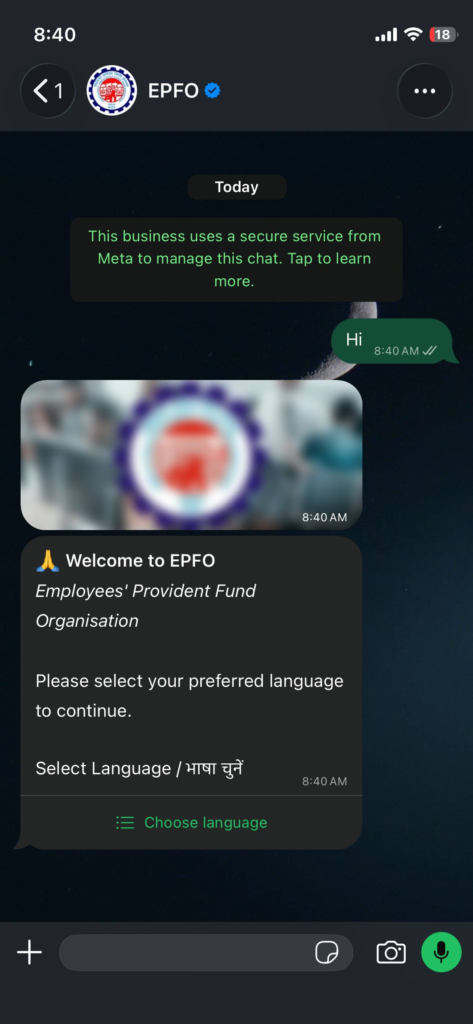
Step 3: Type and Send “Hi”
Once the conversation opens, go to the message box at the bottom of your screen.
Type:
Your first message
Example
Hi
Tap the send button.
After receiving your message, the EPFO WhatsApp chatbot should respond with a welcome message and guide you through the next steps.
Step 4: Select Your Preferred Language
After sending “Hi”, the chatbot will ask you to select your preferred language.
Choose the language you are comfortable with from the available options.
Selecting a familiar language can make it easier to understand the instructions and navigate the different services.
Follow the chatbot’s instructions to proceed.
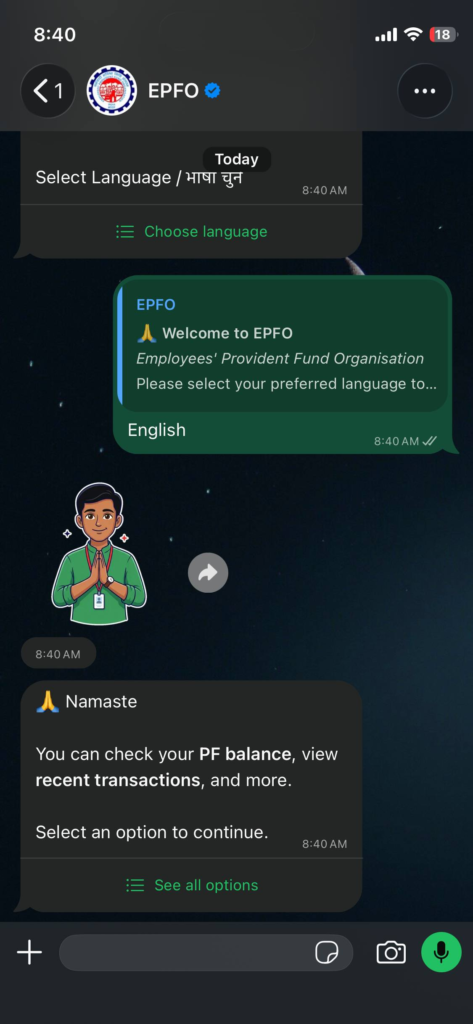
Step 5: Select the PF Balance Check Option
Once you select your preferred language, the chatbot will display a menu of available EPFO services.
Look for the option related to checking your PF balance.
Select that option and proceed according to the instructions displayed on your screen.
Depending on the chatbot’s menu, the available options may also include viewing recent transactions and accessing your EPF passbook.
Step 6: Complete the Required Identity Verification
To protect members’ personal PF information, identity verification may be required before accessing account-related details.
Follow the instructions provided by the official WhatsApp chatbot.
If prompted, complete the OTP verification using the mobile number registered with your Universal Account Number (UAN).
Enter the OTP only in the verified official EPFO conversation when requested by the service.
Never share your OTP with another person over a phone call or through an unrelated WhatsApp conversation.
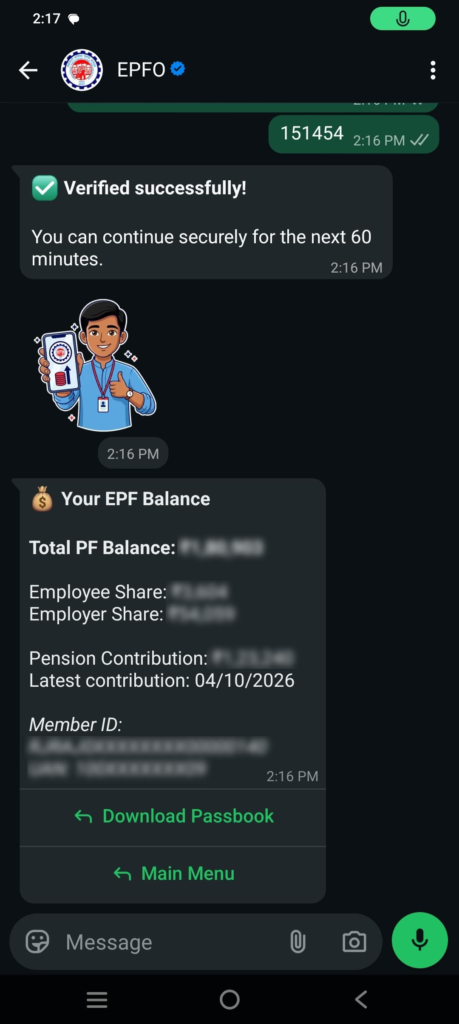
Step 7: View Your EPF Account Balance
After completing the required verification, follow the chatbot’s instructions to access your PF account details.
If you have multiple PF member IDs, select the relevant account if the chatbot provides that option.
Your requested PF balance information should then be displayed according to the service’s available features.
You can review the details and check your account information without having to navigate through the complete EPFO member portal.
Quick recap: PF balance check
- Save +91 87964 41800.
- Open WhatsApp.
- Send “Hi”.
- Select your preferred language.
- Choose the PF balance option.
- Complete identity verification, if requested.
- Follow the chatbot instructions to view your balance.
The exact menu wording and verification prompts may vary as EPFO updates the service.
How to Check Your Last 5 PF Transactions Through WhatsApp?
Apart from checking your PF balance, members can also view their latest five PF transactions using the new WhatsApp facility.
This feature can help employees understand recent activities in their provident fund accounts.
For example, if you want to check whether your employer’s recent PF contribution has been credited, you can use this facility to review the latest transactions.
Follow these steps:
- Open the official EPFO WhatsApp conversation.
- Send “Hi” if you have not already started the conversation.
- Select your preferred language.
- Choose the option related to the last five transactions.
- Complete identity verification if requested.
- Follow the chatbot instructions to view your latest five transactions.
You can then review the available transaction information and check the latest activity recorded in your PF account.
How to Download EPF Passbook Through WhatsApp?
An EPF passbook is an important document that contains details of contributions made towards an employee’s provident fund account.
It helps members understand their PF savings, including employee and employer contributions and other account entries.
EPFO’s new WhatsApp service also provides access to the passbook facility.
Here is how you can use it:
- Open WhatsApp on your smartphone.
- Search for the official EPFO WhatsApp number.
- Send “Hi” to start the conversation.
- Select your preferred language.
- Choose the EPF passbook option from the available menu.
- Complete the required identity verification.
- Follow the instructions provided by the chatbot.
- Access the passbook and follow the available download instructions.
Once you obtain your passbook, you can review your PF contributions and other available account details.
For more detailed account information, members can also use the official EPFO member portal.
Who Can Use the New EPFO WhatsApp Service?
The WhatsApp facility is intended for EPFO members who want to access selected provident fund services through their mobile phones.
If you are an employee covered under EPFO and have an active UAN, this facility can be useful for checking your PF-related information.
Here are some important requirements to keep in mind.
| Requirement | Details |
|---|---|
| Installed on your smartphone | |
| Internet | Active internet connection |
| UAN | Your Universal Account Number |
| Registered Mobile | Access to the mobile number linked to your UAN for verification |
| EPFO Number | +91 87964 41800 |
Members should follow the verification instructions provided by EPFO to access their personal account information.
What Is PMVBRY? Why Is It Included in EPFO WhatsApp Services?
Apart from regular PF-related services, EPFO’s WhatsApp initiative also provides personalised guidance and assistance regarding the Pradhan Mantri Viksit Bharat Rozgar Yojana (PMVBRY).
PMVBRY is an employment-linked initiative introduced to encourage employment generation and support eligible employees and employers.
Through the WhatsApp facility, members can receive guidance and assistance with completing the requirements associated with this scheme.
This addition makes the service useful beyond routine PF balance enquiries.
However, receiving guidance through WhatsApp does not automatically mean that a person is eligible for the scheme or has been approved for any benefit. Eligibility and benefits are subject to the applicable government guidelines.
What Should You Do If EPFO WhatsApp Service Is Not Working?
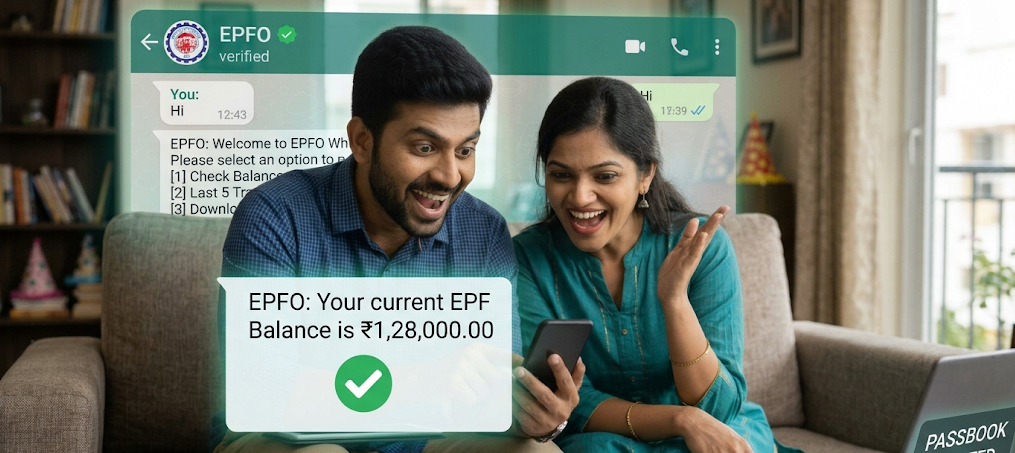
Since the WhatsApp facility is newly introduced, some members may experience temporary technical difficulties while accessing the service.
If you are unable to receive a response or complete the verification process, try the following solutions.
1. Check your internet connection
Make sure your smartphone has a stable internet connection. Try reopening WhatsApp if messages are not being delivered.
2. Verify the WhatsApp number
Ensure that you are messaging the official EPFO number, +91 87964 41800. Do not use numbers shared by unknown websites or individuals.
3. Check your registered mobile number
If OTP verification is required, make sure you have access to the mobile number registered with your UAN.
4. Wait and try again
If you do not receive an OTP or the chatbot stops responding, wait for some time and restart the conversation.
5. Use the EPFO member portal
If the WhatsApp service is temporarily unavailable, you can check your PF balance through the official EPFO website.
Visit the EPFO official website and access the member services section.
You can also use the UMANG portal for supported EPFO services.
Is EPFO WhatsApp Service Safe to Use?
EPFO’s WhatsApp service is an official initiative designed to make selected provident fund services easier to access.
However, members should always follow basic digital security precautions when using any online service.
Keep these important points in mind:
- Use only the official EPFO WhatsApp number.
- Never share your UAN password with anyone.
- Do not disclose OTPs to callers claiming to represent EPFO.
- Never share your ATM PIN, banking password or card details.
- Avoid clicking suspicious links received from unknown WhatsApp accounts.
- Do not install unknown applications to access PF services.
- Always check the authenticity of an account before sharing personal information.
Remember, your PF account contains important financial information. Protecting your personal details is just as important as checking your PF balance.

EPFO WhatsApp Service vs EPFO Member Portal
Many employees may wonder whether the new WhatsApp service will replace the existing EPFO member portal.
The answer is no. Both platforms serve different purposes.
| Feature | WhatsApp Service | EPFO Member Portal |
|---|---|---|
| PF Balance | Available | Available |
| Last 5 Transactions | Available | Detailed account records available |
| Passbook | Access and download facility | Full passbook facility |
| Account Management | Selected services | Broader member services |
| Ease of Access | Simple WhatsApp conversation | Website login required |
| Other PF Services | Limited services | Multiple member services |
The WhatsApp facility is particularly useful for quick enquiries. However, members who need detailed account management or other PF-related services should continue using the official EPFO portal.
Frequently Asked Questions (FAQs)
1. What is the official EPFO WhatsApp number in 2026?
The official EPFO WhatsApp number is +91 87964 41800. Members can send “Hi” to start the conversation and access selected provident fund services.
2. How can I check my PF balance through WhatsApp?
Save the official EPFO WhatsApp number, open the conversation and send “Hi”. Select your preferred language, choose the PF balance option and complete the required verification to access your account information.
3. Can I download my EPF passbook through WhatsApp?
Yes. EPFO’s new WhatsApp service provides a facility to access and download the EPF passbook. Follow the chatbot instructions and complete the required verification.
4. Can I check my last five PF transactions through WhatsApp?
Yes. Members can use the new facility to view their latest five PF transactions by selecting the relevant option from the WhatsApp chatbot menu.
5. Is the EPFO WhatsApp service free?
EPFO has announced the WhatsApp service as a member convenience facility. However, your mobile operator’s normal internet data charges may apply.
6. Do I need my UAN to check my PF balance through WhatsApp?
Your UAN is important for identifying your EPF account. Follow the chatbot’s instructions and complete the required identity verification using your registered mobile number if prompted.
7. Can I use EPFO WhatsApp services without visiting an EPFO office?
Yes. You can access selected services, including PF balance information, recent transactions and passbook access, through WhatsApp without visiting an EPFO office.
8. What should I do if I do not receive an OTP?
First, check whether your registered mobile number is active and able to receive messages. Wait for some time and try again. If the problem continues, use the official EPFO portal or available grievance channels.

Conclusion
The launch of EPFO’s WhatsApp service is a welcome development for salaried employees across India. With the introduction of this facility, members can conveniently check their PF balance, view their latest five transactions and access their EPF passbook using a familiar messaging platform.
The process is simple: save the official EPFO WhatsApp number, send a “Hi” message, select your preferred language and follow the chatbot instructions.
This initiative can reduce the effort involved in accessing basic PF information and make EPFO services more convenient for millions of employees.
If you have an EPF account, you can try this new facility and explore the available services. However, always use the verified EPFO WhatsApp account and follow the recommended security precautions while accessing your financial information.
Disclaimer
The information provided in this article is for educational and informational purposes only. WiseIndia is not affiliated with, associated with or officially connected to the Employees’ Provident Fund Organisation (EPFO) or the Ministry of Labour and Employment.
We have prepared this article based on publicly available government announcements and other published information. EPFO services, procedures, eligibility requirements and verification methods may change from time to time.
Readers are advised to verify the latest information through the official EPFO website before taking any action. WiseIndia does not guarantee the availability or uninterrupted functioning of third-party digital platforms and WhatsApp services.