

Voting is perhaps the most powerful tool we hold as citizens in a democracy. It is our voice, our choice, and our chance to shape the future of the country. However, before you can head to the polling booth, there is one essential document you need: the Voter ID card, officially known as the Elector’s Photo Identity Card (EPIC).
In the past, getting a Voter ID involved multiple trips to government offices, dealing with stacks of paperwork, and often waiting months with no updates. Thankfully, those days are behind us. The Election Commission of India (ECI) has streamlined the entire process through its official portal.
If you are a first-time voter or haven’t registered yet, this guide will walk you through the process of getting your Voter ID for free, right from the comfort of your home.
Why You Need a Voter ID (Beyond Just Voting)
While the primary purpose is to exercise your democratic right, the Voter ID card serves several other roles:
- Identity Proof: It is a universally accepted government ID.
- Address Proof: Since it contains your residential details, it is often used for opening bank accounts or applying for other documents.
- Registration for Government Schemes: Many state and central benefits require a valid Voter ID for verification.
The best part? The government provides the first issuance of this card completely free of charge. You do not need to pay any “agents” or third-party websites.
Phase 1: Preparation is Key
Before you open the website, you need to have your digital documents ready. Nothing is more frustrating than a session timeout because you were searching for a birth certificate.
You will need scanned copies (or clear photos) of:
- A Passport-sized Photograph: Background should ideally be white or light-colored.
- Proof of Identity/Age: You can use your Aadhaar Card, PAN Card, Driving License, or Class 10/12 Marksheet.
- Proof of Address: Aadhaar Card, Electricity Bill, Water Bill, Gas Connection Bill, or a Bank Passbook works perfectly.
Pro-tip: Ensure the file size of each document is under 2MB, and the format is either JPG or PNG.
Phase 2: Setting Up Your Account
First, head over to voters.eci.gov.in.
- Sign Up: On the homepage, you will see a ‘Sign Up’ button at the top right.
- Mobile Verification: You’ll need to enter your mobile number and email ID. You will receive an OTP (One-Time Password). Enter it to verify your identity.
- Create a Password: Choose a strong password. Once done, log in using your registered mobile number and the password you just created.
Phase 3: Filling Out Form 6 (The Heart of the Application)
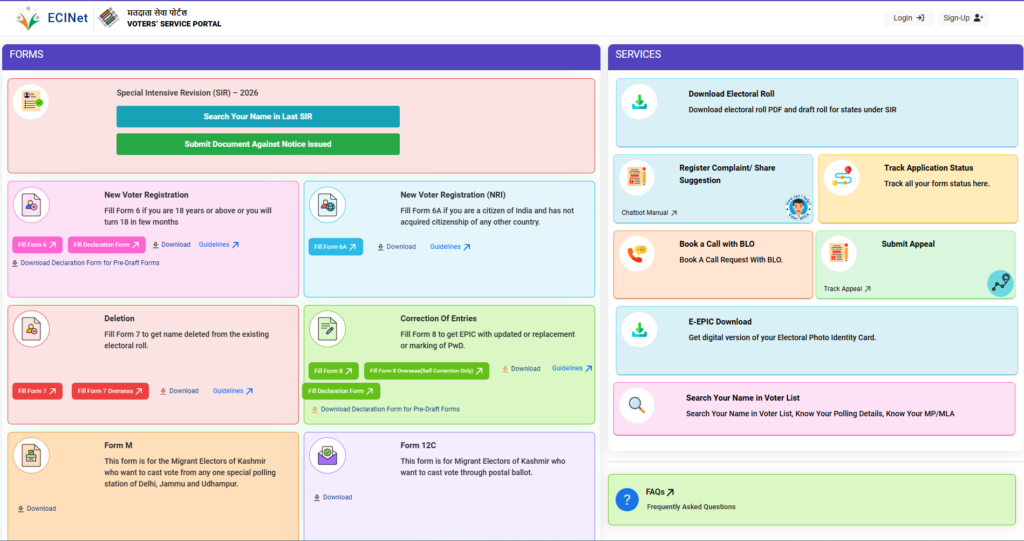
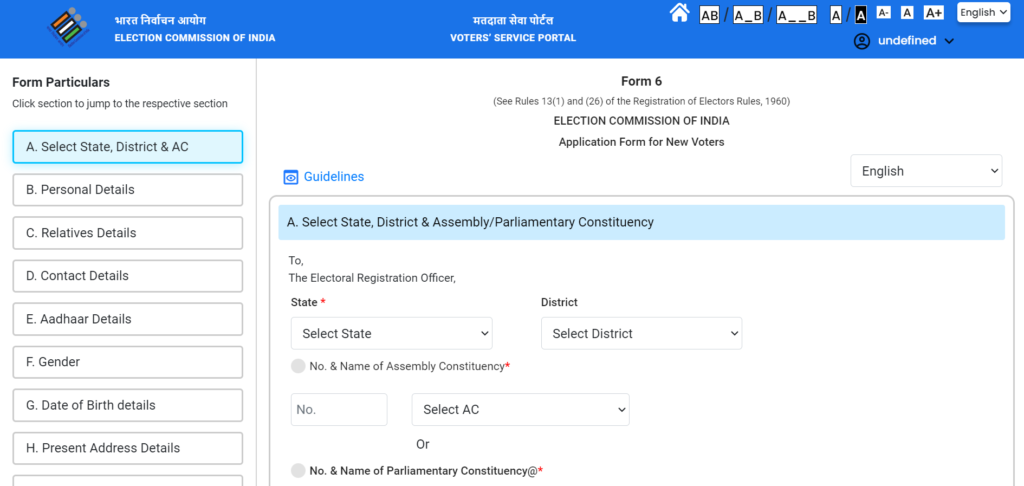
Once you are logged in, you will see several options. For a new voter registration, you need Form 6. Click on “Fill Form 6” to begin.
The form is divided into several sections (A to L). Let’s break them down:
Step 1: Select Your State and Constituency
You will first select your State, District, and Assembly Constituency. If you aren’t sure which constituency you belong to, you can usually find this by looking at the Voter IDs of your family members or neighbors.
Step 2: Personal Details
Here, you enter your name, surname, and relative’s name (Father/Mother/Spouse). A very helpful feature of this portal is that it automatically transliterates your name into your local regional language. Make sure to double-check the spelling in the regional language; if it’s wrong, you can use the on-screen keyboard to correct it.
Step 3: Uploading the Photo
Upload the passport photo you prepared earlier. Make sure your face is clearly visible and not covered by hats or sunglasses.
Step 4: Address Details
Enter your current residential address. This is where your physical Voter ID card will be mailed via speed post. Accuracy here is vital. If the address on your document doesn’t match your current residence perfectly, the Booth Level Officer (BLO) might flag it during verification.
Step 5: Disability (Optional)
If you have any disability, you can mention it here. The ECI provides special facilities at polling stations for Persons with Disabilities (PwD), such as wheelchair access or transport assistance.
Step 6: The Declaration
This is a crucial step. You are declaring that you are an Indian citizen, that you have reached the age of 18 (or will reach it by the qualifying date), and that you haven’t applied for a Voter ID anywhere else. Providing false information can lead to legal complications, so be honest.
Phase 4: What Happens After Submission?
After you click “Submit,” the portal will generate a Reference ID.
Write this down or take a screenshot! This ID is your only way to track your application.
The process now moves into the “Offline Verification” phase:
- Field Verification: Your application is assigned to a Booth Level Officer (BLO). The BLO may visit your home to verify that you actually live at the address provided.
- Review by ERO: The Electoral Registration Officer (ERO) reviews the BLO’s report and your documents.
- Approval/Rejection: If everything is in order, your application is approved. You will receive an SMS notification stating that your EPIC number has been generated.
Phase 5: How to Get Your Card
Once approved, you don’t have to wait for the mail to start using your Voter ID.
1. The Digital Version (e-EPIC): You can download a digital, legally valid version of your Voter ID. On the same portal, click on “e-EPIC Download.” Enter your Reference ID or your new EPIC number. After a quick OTP verification on your registered mobile, you can download a PDF of your Voter ID. You can print this out and laminate it—it is just as valid as the physical card.
2. The Physical Card: The Election Commission will automatically print and dispatch your high-quality PVC Voter ID card. It is sent via India Post (Speed Post) to the address you provided in Form 6. This usually takes 2 to 4 weeks after approval, depending on your location.
Common Pitfalls to Avoid
Many applications get rejected for simple reasons. Here is how to ensure yours goes through smoothly:
- Blurry Documents: If the officer can’t read your name on your Aadhaar card photo, they will reject the application. Use a scanning app for clarity.
- Age Criteria: You must be 18 years old by the qualifying date (usually January 1st, April 1st, July 1st, or October 1st of the year).
- Mismatched Names: Ensure the name on your application matches the name on your supporting documents. If your name is “Suresh Kumar” on your PAN card but you write “Suresh K.” on the form, it might cause delays.
Final Thoughts
The transition of the Election Commission of India to a digital-first approach is a massive win for the common citizen. What used to be a bureaucratic headache is now a simple 15-minute task on a smartphone or laptop.
Getting your Voter ID is not just about getting another card in your wallet; it’s about claiming your seat at the table of democracy. So, if you haven’t registered yet, head over to the portal today. It’s free, it’s easy, and it’s your right.
Happy voting!
Read Also: Now that you’ve secured your Voter ID, make sure your family’s documentation is complete. Check out our Step-by-Step Guide on How to Apply for a New Ration Card Online to ensure you don’t miss out on essential government benefits.
Hii my name durga sri .I am studying engineering b.tech biotechnology. Please help my college fees.
College fees katta kastama irukku